 RSS feed
Category Archives for Technology
I was reminded over the weekend why I love developing software for Apple products, and that I haven’t done nearly enough of it recently. Having spent almost 25 years of my life developing for the Apple II, and the odd thing here and there for the Mac, I thought I should take a look at Apple’s latest Xcode IDE for OS X. Nice. 🙂 (By the way, OS X is pronounced “oh ess ten”)
I’ll probably blog about it later, but I decided to build a virtual radio broadcasting mixer, after being disappointed at what I found on the Internet when I went looking.
Anyway, Xcode is Apple’s current development environment, which includes a funky app called Interface Builder. Interface Builder lets you build all your UI, as you would in any modern IDE, but includes a few extra cool features.
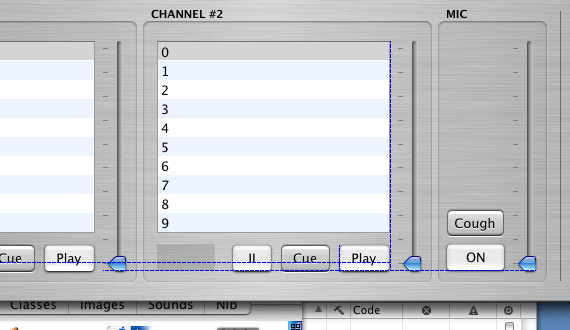 OS X is built around Objective-C and the MVC design pattern, and the name Interface Builder comes from the fact that you use it to visually model your MVC including Objective-C outlets and actions.
When you start lining up controls for a window in Interface Builder, instead of fixed grid sizes like in most IDEs, it generates dynamic grids based on the Apple Human Interface Guidelines. For example, “push button” controls can be 20, 17 or 15 pixels in height, but must be 12, 10 or 8 pixels vertically and horizontally spaced respectively. Certain reserved buttons, like Cancel and OK, must be 68 pixels wide. Lining these controls up in the old days consisted of either manually plugging in values (before we had visual resource editors), or lining them up on dodgey fixed grids that took no notice of controls widths, heights and embellishments.
Well, when you drag controls around in Interface Builder, a dynamic grid is displayed, with line guides wherever an appropriate grid snap should be. In the screen shot, you can see guides for the button text baseline, the bottom button align, the minimum horizontal button spacing, and the right align with the list control. Move the target button around, and guides appear or disappear as appropriate, and the control will snap to a guide when within about two pixels of it. Considering that all OS X controls have an inner frame which is the alignment border, and an outer variable size embellishment frame for the 3D and shadowing effects, this is a life saver.
More on the mixer later, but no wonder there’s a lot of software coming out for OS X. The tools are great, and Objective-C with Interface Builder and other tools is a breeze to use.
Jason Scott is putting the finishing touches on his BBS Documentary, covering the history of the BBS scene from 1978 to the present day, or at least when the web sort of took over from the BBS.
Released on 3 DVDs, with 200 interviews and taking 3 three years to produce, looks like Jason’s done an amazing job, especially getting hold of a lot of the original innovators like Ward Christensen.
Although I haven’t actually seen it myself, I’m sensing a big hole in the research with respect to the AppleII, and more specifically Australia, which had a huge BBS scene. However this is our problem, not Jason’s, as we never really found the time to answer his questions or document the local history for him. Seems a shame to do it after the documentary’s come out, but he’s pestered us enough over the past few years, or least I’m guessing that Andrew was as well.
The only mention I did get is for Eclipse (yes, we had the name first), a pretty cool project, but not much of a landmark release for Australia. In fact I don’t think anyone ever ran it locally, as by then the whole scene had pretty much collapsed. And to rub it in, Andrew gets top billing, which I guess is probably fair considering he basically took over the project once I’d gotten over it. Eclipse was a development platform, including plug in drivers and a Pascal/REXX hybrid language designed specifically for BBS use.
Anyway, if you have an interest in the 1980s BBS scene, take a look at Jason’s site, or even grab a copy of the documentary. And if you’re interested in hearing about the Australian history, then perhaps keep pestering me to find the time to write it all up. Although some of it is covered in my personal history of the Australian Apple II scene.
It’s been a week since I wrote about how podcasting will have its biggest effect on community radio, and about 3-4 weeks since podcasting began, at least in its current form. What we in Australia call community radio by the way, in the U.S. they call public radio.
Public/community radio is mainly funded by sponsors and government grants, this is true in Australia and the U.S., so to embrace podcasting, where is the money going to come from for the bandwidth and storage of program content?
Let’s actually drop the facade and instead of calling it podcasting, call it what it is, on-demand radio, which has been around for at least decade. The podcasting part is just the technology to get it out of a feed and onto an iPod or similar device.
Interestingly enough, the blogosphere seems divided at the moment between whether it’s a fad, or a revolution, although with a majority tending to side with revolution. Here’s one against, which pretty much sums up my opinion as well. Online Journalism Review has some good coverage of some of the issues, but at the end again descends into hypeland by quoting Russell Beattie slightly out of context. The ghist of it being:
[..] there are going to be 650 million phones shipped this year alone. How big will podcasting be when all those phones can be “podcast players?” Think you’re at the beginning of a trend now? Just wait.
Well like I said in my previous post, radio does this already. Everyone has a radio receiver, heck even my mobile phone does. How often do I or you listen to it?
The big problem is going to be content, and this is where the current community radio broadcasters will hopefully jump in, as that’s their biggest asset, varied programming. Unless of course they’re one of the stations who have already shifted from specialist to block programming. Wise move guys. 😉
Maybe Dave Pollard’s ideas will help, maybe more content sources will help, but in a world of information overload, when we’re bombarded left right and centre with information, including hundreds or thousands of RSS feeds, how many of us will bother listening to the radio for this type of content? I’m guessing roughly the same as do now. Except of course the podcasters, who don’t seem to have heard of or listened to community or public radio.
As an aside, in the next few months we’ll be trialling limited podcasting from our radio station. This in conjunction with our company’s work on Sauce Reader, should give us some valuable insight into where we’ll be in a few years’ time.
Saw a mildly amusing tshirt this morning on the way to work in Sunny ol’ Canberra, which I’ve since found after googling it, did the rounds a few years back. No matter:
There are 10 types of people in this world. Those that understand binary, and those that don’t.
Like I said, mildly amusing, perhaps because I fall into the former camp, and am still able to quote ASCII and 6502 instruction codes at will.
A week or so ago, I wrote about Podcasting: The little brother of RSS, or the future of community radio? on my personal weblog, namely due to my background in community radio. Enjoy.
Podcasting in its simplest form, is the posting of blog posts in audio format, and having them automatically end up on subscribers’ iPods, ready for playback. It’s not so much the audio blogging that’s the innovative part, as on-demand audio has been around almost as long as the web. We used to broadcast our radio show on the Internet, back in 1998, and I’ve still got copies of shows sitting in my iTunes. Big deal.
The real innovation is making on-demand audio easier to use, namely through two technological breakthroughs: 1) automatically removing the audio from an RSS feed (via enclosures), and 2) automagically downloading the audio from iTunes specifically to an iPod, ready to play. Podcasting offers nothing new content wise that community radio hasn’t been providing for the last 40 years, but hey, everything goes in cycles.
The beauty of RSS/Atom, is that it delivers only the bare content, the raw information you’re interested in. You don’t have to visit a web site, you don’t have to scan through pages of navigation and HTML embelishments to get to the actual content.
Podcasting is supposedly the audio version of this, but it fails. All the podcasts I’ve listened to, including Adam Curry’s genre defining Daily Source Code, are about 20-30% useful information, and the rest is umms, ahhs, repetitions, or information that’s easier and faster to get in textual format through other feeds. In fact, all the podcasts I’ve heard, sound like they were simply recorded from community radio, and if you had to read that amount of text to get to the useful bits in a standard RSS feed, you’d end up unsubscribing.
Dave Pollard has talked about useful ways to reduce the effluvium in audio through the use of pitch shifting/time compression, which is infinitely more useful in reproducing audio with the useful characteristics of RSS content, than podcasting. But of course, useless content (umms, ahhs, repetitions etc.), at any speed, is still useless content.
There are however notable reasons why podcating will make a big impact, and it isn’t because people can get on-demand audio.
Lets talk about traditional radio for a bit. Webcasting was supposed to be the traditional radio network killer, and was going to eat into the major radio market over the years during and following the bubble. Like most ideas from that time however, the technologists failed to recognise what was so good about radio. Radio is audio only, there’s no visuals, plus most radio broadcasting is programmed for the masses, so it tends to be the conservative middle of what we as individuals would like to hear. We don’t get to pick the music that’s played, we can’t rewind at all, we have to listen at the exact time the show is on, we can only pick up certain shows in our local area (unless networked) and in many cases we don’t agree with the announcers’ opinions.
With all these flaws, how come radio still succeeds? For three reasons: 1. Because you can pick it up anywhere. 2. Because it is free of charge (no collection/bandwidth/CPU costs). 3. Because you don’t have to concentrate to listen to it, it runs in the background while you multitask.
At home, in the kitchen, while vacuuming, in the car, on the street, think of the radio walkman, or your clock radio which not only turns the radio on at a set time, but can also turn it off after an hour of you being asleep. On a plane, a train, in class, at work, radio is available everywhere, that’s why we tolerate all it’s inherent faults.
So what do the technologists do? They broadcast it over the web, thus solving the problem of reach, but breaking radio’s only real redeeming feature, the ability to take it anywhere. No wonder it failed.
But who says that reach was a problem anyway? Most local programming is local for a reason, meaning the only radio programming that really benefits from streaming is niche special interest programming. But the cache 22, is that with so few listeners, the chances are that most won’t be able to listen in at the right time anyway. Of course there’s always going to be a minority of people who want to sit at their computer all day and listen to low quality audio streams from Internet radio stations, but in general, webcasting is flawed for use in radio broadcasting.
So, the only real Internet based alternative to traditional radio broadcasting, is specialist programming. There are still problems of course, people can only pick it up while they have an Internet connection and a capable computer, tuning in is harder than using a radio, and not everyone wants to sit in front of their computer just to hear the radio. By providing the content on-demand however, people can listen to what they’re interested in, in their own time, and this is the principle behind podcasting.
The bottom line is, the only type of radio broadcast that will be better served with podcasting, is actually community radio. This is why podcasting is so important, because it will change the community and special interest radio stations forever, and will probably shut a lot of them down. Podcasting is community radio.
There’s an argument doing the rounds of the blogosphere at the moment that podcasting will threaten the big radio broadcasting networks, but for the reasons above, that’s not going to happen.
First, mainstream radio only works when everyone can pick it up anywhere, and the only real solution to that is a big mast, real estate to house it, an expensive and power hungry transmitter, and an expensive license from the government regulator. This won’t change, because the radio wave spectrum is becoming more and more expensive as technology advances.
Second, community radio has been around for almost 40 years now, and hasn’t affected the big networks one iota, even though, like podcasting, like webcasting, it was supposed to. What’s more, at the moment community radio is easier to pick up and listen to than the Internet, for the reasons mentioned earlier. Even my phone picks up radio and has earphones, that’s the sort of simplicity that you’d need to equal or beat.
So, podcasting won’t affect mainstream radio, but it just may replace community radio, and that’s a big shame. However, unlike the record companies and the RIAA, we’ll be working our butts off over the next few years to make sure our community radio business models change as the technology changes. Instead of fighting the podcast revolution, we’ll actively integrate it into whatever form community radio will take over the next 5-10 years. Watch this space, the world is about to change again, and not in the way most podcasters are expecting.
Don’t get me wrong, I like the Daily Source Code, and would love to have it on our radio station, but really, it’s still just community radio.
I’ve noticed that my posts are quite verbose and vague at times, so I’m going try something new. Reduced verbage, more examples and less (maybe) soapboxing.
My post on CSS and dynamic page construction drew a comment about how I was an idiot for not using CSS. The problem is that I never said that we weren’t using CSS. CSS is a great technology, just not for certain types of web sites. You’d think I’d be able to explain my position a bit better, but it took Matt (our Sytadel technical lead) to come along and explain it a bit better by asking a few important questions. So let me try again.
Think of a web page, which contains the following:
This is emphasised.
Assume it contains some CSS selectors like the following:
P { font-family: Tahoma, Arial, Helvetica, sans-serif; font-size: 10pt }
EM { color: red; font-weight: 200 }
DIV.photo IMG { margin: 0.5em }
These selectors state that paragraphs will be in Tahoma, EM elements will be in red, and IMG descendants of DIVs with a class of “photo” will have a half em margin.
Now assume the above HTML fragment is placed inside a web site which has a completely different branding, yet we still want the HTML fragment to display as it would on the original site. Perhaps the new site is an aggregator for other sites, or a portal with previews of other sites.
We now have problems. How do we specify red EMs for the HTML fragment? The obvious solution is to wrap the fragment in a DIV with an ID or CLASS, and change the EM selector to a descendant selector:
EM { color: red; font-weight: 200 }DIV.fragment EM { color: red; font-weight: 200 }
This fixes the EM, but what about the other infinite number of combinations? Perhaps we just take the style sheet and prefix everything with the DIV.fragment descendant selector?
DIV.fragment P { font-family: Tahoma, Arial, Helvetica, sans-serif; font-size: 10pt }
DIV.fragment EM { color: red; font-weight: 200 }
DIV.fragment DIV.photo IMG { margin: 0.5em }
Unfortunately this doesn’t take into consideration the initial default CSS settings for all the standard HTML elements. For example, the original site uses the default for TH, a centred bold, yet the new site has its own definition, a left aligned pink. Now we need a DIV.fragment TH selector in the stylesheet, which resets every CSS attribute for TH, so it looks like the initial default state. Likewise, our fairly short P selector would now expand out to several dozen lines defining the default styles for a P element. I’m not even sure if that’s 100% possible to do, take an arbitrary CSS state and redefine it to the original initial default settings.
What if we wanted the new site to display the fragment slighty smaller inside a box on it’s pages? Simple, use a font-size: 0.8em on the fragment’s wrapping DIV:
DIV.fragment { font-size: 0.8em }
The problem with this though, is that the fragment already has a definition for a 10pt font size, so the new site has to know this, and remove it, along with any other definitions which conflict with it’s wishes. Then don’t forget to include all those CSS resetting definitions as well. Be careful of the ones that interact in mysterious ways, like how a TD can affect the style of a P, regardless of the cascade.
One last problem I’ll mention, and yes there are many others, is what if “photo” is also a defined class in the new site? So we now have to go through and rename all the classes, and update the stylesheet so there’s no conflict. At least this one seems easy enough to solve with some simple renaming logic.
All these problems go away of course, if the person coding the stylesheet knows what the final HTML will look like. This is the Zen Garden catch, you need to know what the code looks like, before you can start doing anything interesting. In some CMS environments, you don’t have that luxury, which limits what you’re able to safely do design wise.
Which brings me back to the original statement from my previous post which the anonymous comment poster took issue with: CSS is designed to be applied by designers who know exactly what is contained within the page. If you don’t know the CLASSes, the IDs or the hierarchy, then good luck applying any sort of design outside single element level embellishments, like site wide font size or background colour.
I think it is possible to design a layout and style technology which address these problems, and even amendments to the CSS standard could possibly get us most of the way there. But that’s best left for another post.
OK, so I lied about the soapboxing.
(Originally posted to Synop weblog)
The “I found some of your life” post that did the rounds a few weeks ago was amusing. Not because of what happened, but because of what could be. Some background, a guy found a camera and didn’t know who it belonged to, so he posted one photo per day online and added his own candit comments about each photo. Eventually someone came forward and the site was taken down, but not before it did the rounds of the blogosphere, and finally made it to Slashdot, where someone put the pieces together and found other photos online of the same people.
Anyway, the interesting part is that this is effectively an old impro game we call Pop-up Storybook, where each scene is a frozen piece, improvised by on stage players, with an off stage player providing an improvised commentary. It is tempting to take a couple of dozen photos from a night out, and have some of Sydney’s top improvisers provide a running commentary online. There are sites for photoshopping contests, and photo caption contests, why not Pop-up Storybook?
Which brings up the issue of what other impro games could be played online?
Of course if you’re in Sydney, you could always see the real thing with yours truly, tomorrow night at the Clarence Hotel. 🙂
Victor Lombardi’s article on integrating CSS with Content Management Systems (via Step Two Designs) provides an interesting use case for provision of CSS editing for CMS users. However in our experience, CSS just isn’t that abstracted enough from the content to be useful for anything but the most simplistic style changes.
In a moderately complex CMS, page construction is a dynamic process, meaning that layout tends to be quite generic, so the presentation may be used across multiple sections of the site. This can at times be a fairly limiting requirement, and actually conflicts with the precise nature of CSS, so much so that we’ve already resigned to the fact that CSS2 is a fairly flawed if not inappropriate technical solution for dynamic/generic presentation.
 Let us break down a dynamically constructed CMS page, in this case a page from one of our old company web sites. The diagram at right shows a page constructed by our Sytadel product, overlayed with colour coding for the main wire framed areas of the site. We refer to sections of content on a page as “boxes”, which is very similar to the flat CSS box model, but in Sytadel’s case, the boxes are hierarchical.
The key to dynamic page construction, is understanding the need for hierarchical page templates. In the example diagram, first we have a default site branding, which consists of the red header, the purple footer, and the left multi-coloured context box. Many technologists think a header and a footer solves the branding problem, but this doesn’t give your designers much flexibility. You typically need some type of high level template within which you can drop your page design and your generic content. In many cases this looks as if it is a simple header and footer, but underneath it isnt.
Once the branding is applied, the next level down is the main content layout, which in this example is the parent box for the blue, pink and orange boxes. Inside this is the blue content item box, containing what we call the primary item for the page, and the pink and orange item context boxes, presenting information appropriate for or related to the primary item.
Inside the left side context box, is another box which I’ve placed inside a solid red border. This is roughly at the fourth level down inside the page’s construction hierarchy, and contains various content creation, editing and maintenance tools.
This quite simple dynamic page, when modelled, has a fairly complex tree structure, and contains about 60 different views on various items from the CMS. There are full content views, like in the blue box, summary views of items, like in the orange and green boxes and at the bottom of the blue box, hyperlink views like in the red header, and even drop down control views in the light blue box.
I should add that with this type of construction, it is actually the primary item for the page which dictates the entire construction logic and ordering, not the page itself, and that the layout for each level needs to be defined in construction logic so that it may be reused, and not just through a standard CSS definition.
With all this genericism, how on earth do you apply CSS to layout and style? Well, Sytadel’s construction engine also builds inline ID and CLASS attributes for each box and each view of an item in a box. This way you can specify the style of a title of an item for example, when it is inside a hyperlink view, which is inside a content creation box, which is inside a left context box, which is inside a page layout box, which is inside a particular branding. Want to change how it looks to a particular user or group of users? Same idea, but just a little more complex.
This places a lot of the implementation upon CSS’ shoulders for layout and cascading, and unfortunately due to the still limited browser support for the more useful CSS2 features, and the flat-flow design of CSS, the design of these stylesheets can be fairly complex if you want them to be.
The initial design for Sytadel was of a complex generic and hierarchical page construction engine, where you can place views of items inside items ad infinitum. A great use for this is with thumbnailing of content. Mark a box with font-size: 0.6em and you suddenly have a way to thumbnail entire HTML items, and in Sytadel’s case we can even embed pages within pages, all CSS controlled through cascading.
CSS is designed to be applied by designers who know exactly what is contained within the page. Thus CSS styles are great for static sites, or for dynamic pages where most if not all pages have exactly the same layout or limited construction hierarchy. With dynamic sites however, CSS doesn’t really cut it, and certainly not for regular or even admin users to edit simple stylesheets.
Let’s be honest, changing the style of an H1 container isn’t really a particularly useful function for a CMS, and is probably more likely available for CMS expectance/compliance reasons than anything else.
Update: I’ve written a follow up to this post, The limits of CSS for dynamic page construction — explained, which goes into some more detail about why this is a problem.
(Originally posted to Synop weblog)
Much of the brouhaha about bandwidth and scalability of RSS feeds stems from the common misconception that feed data is second class data. The Radio Userland model is just one source of the misconception, in that data is dropped into the queue, shuffles it’s way down the chain, and then disappears off the end, a window onto a moving data flow if you will. (Feel free to extend the chain metaphor to it’s logical conclusion)
If you continue this misconception, then you jump to all sorts of myopic conclusions, such as:
- Data is redundant – if you miss a post, who cares
- GUIDs are nice to haves – if I update an a post, who cares if the feed sends a second copy
- Full text isn’t important – just click and you’ll go to the item in a browser
- You’ll get the item eventually – who cares if it is a day late, so long as I can read it
- Filtering defeats simplicity – I’d rather have a million items to read through manually, than have a useful and usable mechanism for cutting, slicing, dicing and sorting important data
- Take what the site pushes – I like being subservant to big publishers, so I don’t have to think about what might be important to me
Wrong, wrong, wrong. Feed items are first class data, and should be treated as such.
When Scoble talks about pulling down full text for posted items, he’s not a nutter with shares in fat pipe providers, he’s an information consumer with a hunger for knowledge, and only he knows how and where he’ll use that data. Once I have that data in my possession, I can do with what I like, read it, re-publish it, annotate it, combine it, scan it, summarise it, print it (in my preferred format/style), convert it to spoken audio (using Windows and Mac voice tools), cross analyse relationships between items, etc. And once the data starts to move away from free text and into more structural data, the skies are the limit. I’m like Scoble (I can’t believe I just said that), and our numbers are growing.
Regardless of the filtering nirvana that I usually rant about, the future is coming, and it is full text and structural data, regularly updated on demand, navigable, and maintains data and relationship integrity. Sure, our current protocols are completely inadequate for these purposes, but then we’ve already been saying this to the RSS biggots for almost a year now.
I’m sensing momentum… perhaps the fog is starting to clear.